Join WhatsApp
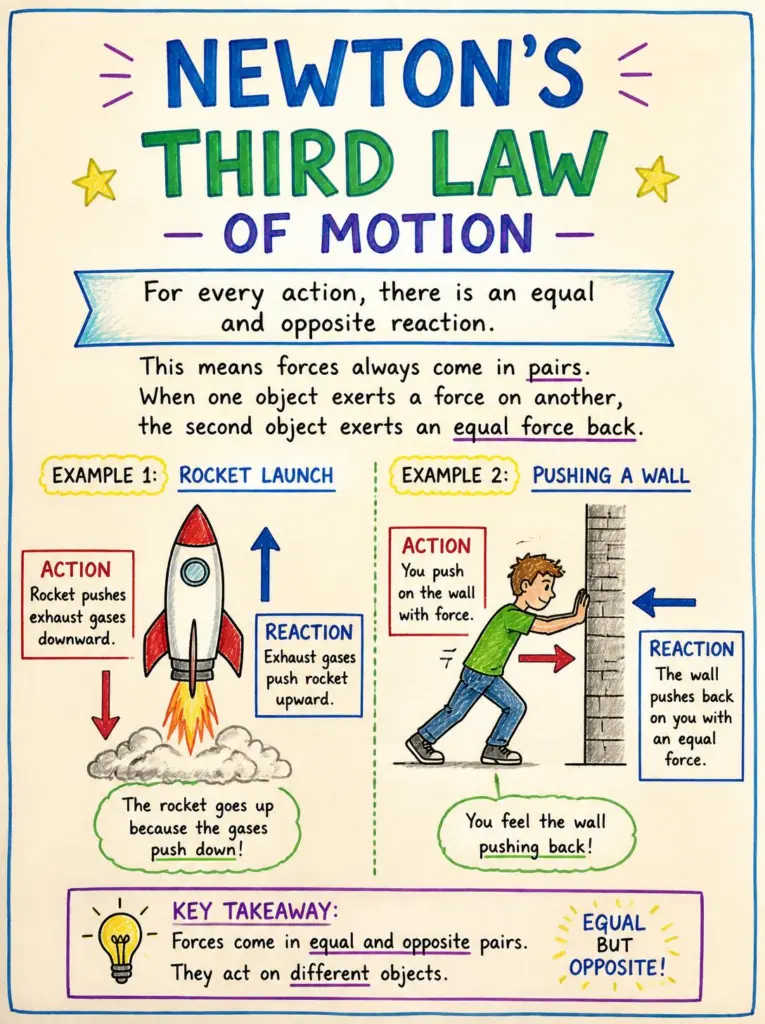
Visual explainer prompt: a hand-drawn infographic of any topic โ€“ sample result
Sample result ยท AI-generated
ChatGPT ยท Gemini

Visual explainer prompt: a hand-drawn infographic of any topic

Explain a science law or any idea in one page: this ChatGPT visual explainer prompt draws it as a friendly hand-drawn infographic.

Create a hand-drawn educational infographic that explains [Newton's third law of motion] to [a 14-year-old student]. Title at the top in bold hand lettering: "[Every Action Has a Reaction]". Show 3 simple numbered panels with sketchy illustrations: [1 a person on roller skates pushing off a wall, 2 a rocket pushing gas down and rising up, 3 a swimmer pushing water back to move forward]. Use arrows to show the paired forces, each labelled with one short phrase. At the bottom, a one-line summary in a box. Style: black ink drawings with light watercolour washes in blue and orange on off-white paper, notebook doodle feel. Spell every word correctly, keep text short, aspect ratio 3:4.

Add "newtrendingprompt.com" as a small, subtle watermark in the bottom-left corner.
Aspect ratio
3:4
Your photo
Not needed
Copies
Be the first

Updated ยท By

Tip: Ask a chat model to write the title, three panel ideas and the summary first, then paste them into the brackets.

1. CopyTap "Copy prompt" above.
2. Paste + photoOpen Gemini or ChatGPT, add a clear selfie, paste.
3. Retry if neededIf the face changes, run it once more.

Why this prompt works

This ChatGPT visual explainer prompt does the teacher's planning for the image tool: one idea, one audience, three examples and a summary. Image tools make clearer diagrams when the text and scenes are decided in the prompt rather than left to chance.

Arrows with short labels carry the explanation, and naming the reader's age sets how simple the drawings and words should be. Ink with light watercolour on off-white paper keeps it friendly and readable, like a page from a good class notebook.

How to use this prompt

  1. Tap "Copy prompt".
  2. Open ChatGPT or Gemini.
  3. No photo is needed for this one.
  4. Paste the prompt and send.
  5. If the face or details change, run it once more and keep the best result.

Variations to try

Photosynthesis for primary school

ChatGPT Gemini
Create a hand-drawn educational infographic titled "How Plants Make Food" for a 9-year-old. One large smiling plant in the centre with arrows: sunlight coming in from the sun, water rising from the roots, carbon dioxide entering the leaves, oxygen and sugar coming out. Each arrow has a two-word label. Bright coloured pencil style on white paper, simple and cheerful, spell every word correctly, aspect ratio 3:4.

Add "newtrendingprompt.com" as a small, subtle watermark in the bottom-left corner.
Aspect ratio
3:4
Your photo
Not needed
Copies
Be the first

How a UPI payment works

ChatGPT Gemini
Create a hand-drawn flowchart infographic titled "How a UPI Payment Travels" for a first-time user. Five numbered steps with simple sketches joined by arrows: scan the QR code, enter the amount and PIN, the app sends the request, the bank moves the money, the shop gets a confirmation sound. Short labels only, black ink with green and orange highlights on off-white paper, spell every word correctly, aspect ratio 3:4.

Add "newtrendingprompt.com" as a small, subtle watermark in the bottom-left corner.
Aspect ratio
3:4
Your photo
Not needed
Copies
Be the first

How a bill becomes a law

ChatGPT Gemini
Create a hand-drawn civics infographic titled "How a Bill Becomes a Law" for high school students in the United States. Six numbered steps along a winding path: an idea, the bill is introduced, committee review, a vote in the House and Senate, the President signs or vetoes, it becomes law. Simple sketches at each step, short labels, blue and red ink on cream paper, spell every word correctly, aspect ratio 3:4.

Add "newtrendingprompt.com" as a small, subtle watermark in the bottom-left corner.
Aspect ratio
3:4
Your photo
Not needed
Copies
Be the first

Make it your own

  • Change the topic and the reader in brackets, for example "the water cycle" for "a 10-year-old".
  • Switch the style: "white chalk on a green chalkboard", "whiteboard marker sketch" or "blueprint lines on dark blue".
  • For a wide slide, change the ratio to 16:9 and lay the panels out left to right.

Common problems and fixes

  • Labels have spelling mistakes. Use fewer words, put every label in quotes and ask "Fix the spelling of [word] and keep everything else the same".
  • The page is too crowded. Keep it to three to five panels and one short phrase per arrow.
  • A fact or arrow is wrong. Check the content against a textbook, then ask for a fix by naming the exact arrow or label.

FAQ

Can teachers use these in class?

Yes, as a starting point. Check every fact, label and arrow before sharing, because image tools can still draw a wrong detail.

What topics work best?

Ideas that can be shown with three to six simple pictures and arrows: science laws, processes, timelines and step-by-step how-tos.
๐Ÿ”’ Photo safety: Don't upload photos of children or ID-style photos, and only use the official Gemini or ChatGPT apps.