Join WhatsApp
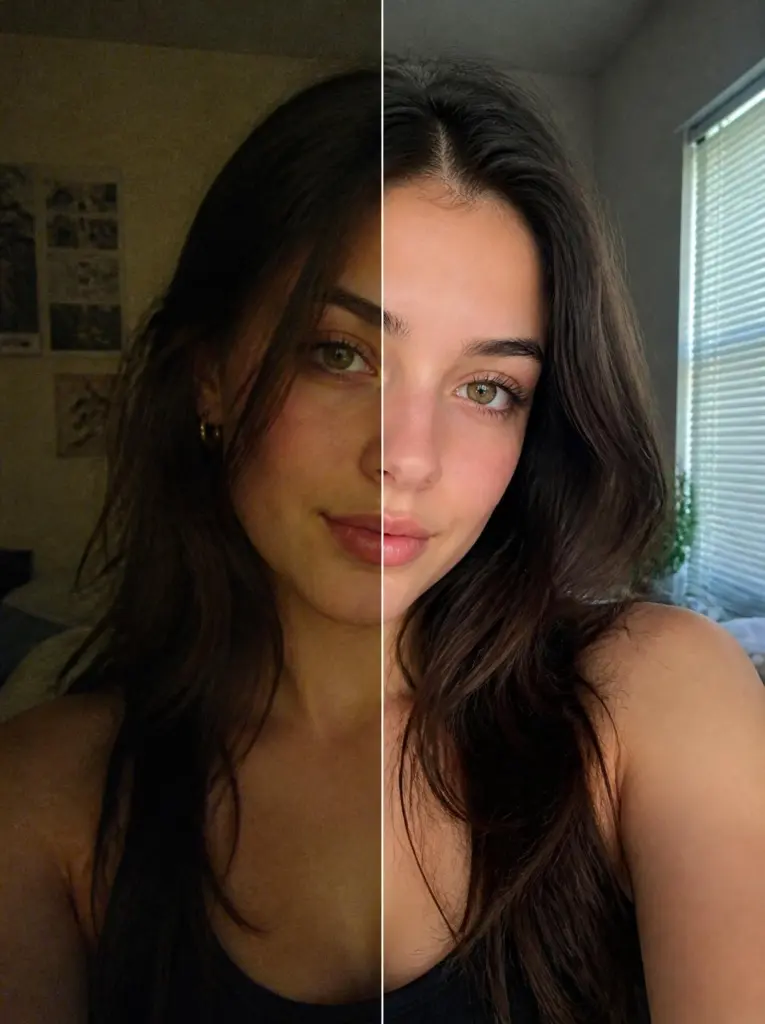
Fix photo lighting prompt: brighten a dim selfie naturally โ€“ sample result
Sample result ยท AI-generated
ChatGPT ยท Gemini

Fix photo lighting prompt: brighten a dim selfie naturally

This ChatGPT fix photo lighting prompt brightens a dark, yellow indoor selfie with soft window light while everything else stays the same.

Keep the face exactly the same as the uploaded photo: same eyes, nose, lips, jawline, skin tone and expression. Relight this photo only. Keep everything else exactly as it is: the same pose, hair, clothes, background, framing, camera angle and crop. Fix the dim, uneven indoor light so the face is evenly and softly lit, as if by a large window just to the side of the camera. Lift the dark shadows under the eyes and on one side of the face, correct the yellow colour cast to a natural white balance, recover detail in dark hair and clothes, and remove grain. Keep natural skin texture, no beauty smoothing, no added makeup, aspect ratio 3:4.

Add "newtrendingprompt.com" as a small, subtle watermark in the bottom-left corner.
Aspect ratio
3:4
Your photo
Upload one
Copies
Be the first

Updated ยท By

Tip: Change the aspect ratio at the end to match your original photo so the crop does not shift.

1. CopyTap "Copy prompt" above.
2. Paste + photoOpen Gemini or ChatGPT, add a clear selfie, paste.
3. Retry if neededIf the face changes, run it once more.

Why this prompt works

This ChatGPT fix photo lighting prompt starts by locking everything except the light. Listing pose, hair, clothes, background, framing and crop leaves the tool only one job, so it does not redraw your photo while it brightens it.

Naming the problem (dim, uneven, yellow) and the target light (a large window beside the camera) gives a specific, natural result. "No beauty smoothing, no added makeup" matters because many image tools quietly retouch faces when they are asked to improve a photo.

How to use this prompt

  1. Tap "Copy prompt".
  2. Open ChatGPT or Gemini.
  3. Upload one clear, front-facing photo in good light.
  4. Paste the prompt and send.
  5. If the face or details change, run it once more and keep the best result.

Variations to try

Warm golden hour relight

ChatGPT Gemini
Keep the face exactly the same as the uploaded photo: same eyes, nose, lips, jawline, skin tone and expression. Relight this photo only, keeping the pose, clothes, background, framing and crop exactly the same. Replace the flat light with warm golden hour sunlight coming from the left, a soft glow on the cheek and hair, gentle long shadows, a slightly warmer colour balance across the whole scene. Keep natural skin texture, no smoothing, aspect ratio 3:4.

Add "newtrendingprompt.com" as a small, subtle watermark in the bottom-left corner.
Aspect ratio
3:4
Your photo
Upload one
Copies
Be the first

Backlit window fix

ChatGPT Gemini
Keep the face exactly the same as the uploaded photo: same eyes, nose, lips, jawline, skin tone and expression. This photo was taken against a bright window and the person is too dark. Keep everything exactly the same, but balance the exposure: light the face softly and evenly from the front, bring back detail in the hair and clothes, and keep the view through the window visible instead of pure white. Natural colours, natural skin texture, aspect ratio 3:4.

Add "newtrendingprompt.com" as a small, subtle watermark in the bottom-left corner.
Aspect ratio
3:4
Your photo
Upload one
Copies
Be the first

Soften a harsh flash photo

ChatGPT Gemini
Keep the face exactly the same as the uploaded photo: same eyes, nose, lips, jawline, skin tone and expression. This night photo was taken with a harsh direct flash. Keep the pose, outfit, background and framing exactly the same. Replace the flash with soft, even light, remove the shiny glare on the forehead and nose, soften the hard shadow behind the head, and bring back some of the warm ambient light in the room. Natural skin texture, aspect ratio 3:4.

Add "newtrendingprompt.com" as a small, subtle watermark in the bottom-left corner.
Aspect ratio
3:4
Your photo
Upload one
Copies
Be the first

Make it your own

  • Match the ratio to your photo: most phone photos are 3:4 or 9:16 for vertical shots.
  • Change the light mood: "cool overcast daylight" for a calm look, "warm lamp light" for a cosy one.
  • For a group photo, start with "Keep all faces exactly the same as the uploaded photo" instead of the single-face line.

Common problems and fixes

  • The background or clothes change too. Keep the full "keep everything else exactly as it is" list and add "change only the lighting".
  • The face looks airbrushed. Keep "natural skin texture, no beauty smoothing" and add "visible pores and fine detail".
  • It looks too bright and fake. Add "subtle, natural improvement, about one stop brighter".

FAQ

Is this better than a brightness slider in an editing app?

For light that needs to come from a new direction, yes, because the AI can add light that was never in the photo. For a simple brightness tweak, an editing app is quicker.

Will the result be the same quality as my original?

The result is a new image at the tool's size, so very fine detail can shift slightly. Compare it with your original before you delete anything.
๐Ÿ”’ Photo safety: Don't upload photos of children or ID-style photos, and only use the official Gemini or ChatGPT apps.