Why this prompt works
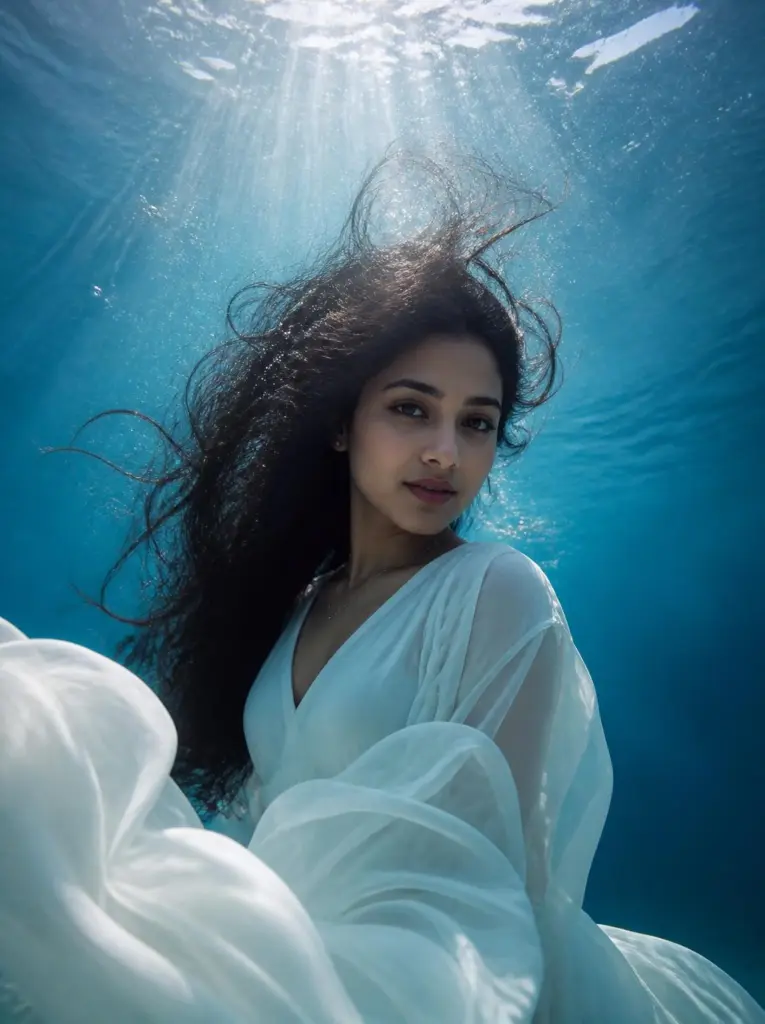
This ChatGPT underwater portrait prompt describes the three things that sell water: light beams from the surface, ripple patterns on skin and fabric, and rising bubbles. Without them, the tool tends to make a blue-tinted studio photo.
Fabric and hair drifting upward show weightlessness, and a calm, open-eyed face with a closed mouth keeps your features clear. Fading from turquoise to deep blue below adds depth, so the person seems suspended in water rather than pasted on a background.
How to use this prompt
- Tap "Copy prompt".
- Open ChatGPT or Gemini.
- Upload one clear, front-facing photo in good light.
- Paste the prompt and send.
- If the face or details change, run it once more and keep the best result.
Variations to try
Silk saree underwater
Keep the face exactly the same as the uploaded photo: same eyes, nose, lips, jawline, skin tone and expression. An underwater portrait of this person in a red silk saree with a wide gold border, the pallu flowing out in soft waves, floating in clear blue water with orange marigold petals drifting around them. Sun rays from above, caustic ripples on the silk, a few bubbles, calm open eyes, hair drifting away from the face, aspect ratio 4:5.
Add "newtrendingprompt.com" as a small, subtle watermark in the bottom-left corner.
Add "newtrendingprompt.com" as a small, subtle watermark in the bottom-left corner.
- Aspect ratio
- 4:5
- Your photo
- Upload one
- Copies
- Be the first
Night pool in a suit
Keep the face exactly the same as the uploaded photo: same eyes, nose, lips, jawline, skin tone and expression. An underwater portrait of this person in a swimming pool at night, wearing a dark blazer over a white shirt, jacket floating open, sinking slowly with a calm expression. Lit from below by soft blue pool lights, gentle ripples, a trail of small bubbles, the pool surface glowing above, dreamy cinematic mood, aspect ratio 4:5.
Add "newtrendingprompt.com" as a small, subtle watermark in the bottom-left corner.
Add "newtrendingprompt.com" as a small, subtle watermark in the bottom-left corner.
- Aspect ratio
- 4:5
- Your photo
- Upload one
- Copies
- Be the first
Coral reef swim
Keep the face exactly the same as the uploaded photo: same eyes, nose, lips, jawline, skin tone and expression. An underwater portrait of this person swimming gently near a colourful coral reef in shallow tropical water, wearing a loose short-sleeved linen shirt, small yellow and blue fish around them. Sun rays slanting through clear water, caustic patterns on the sand, a few bubbles, calm face towards the camera, mouth closed, aspect ratio 4:5.
Add "newtrendingprompt.com" as a small, subtle watermark in the bottom-left corner.
Add "newtrendingprompt.com" as a small, subtle watermark in the bottom-left corner.
- Aspect ratio
- 4:5
- Your photo
- Upload one
- Copies
- Be the first
Make it your own
- Change the water colour: "emerald green lake water" for a moody look, "pale aqua" for a bright one.
- Add floating details that suit the outfit: rose petals, lotus flowers or soft fabric ribbons.
- For a wide cinematic frame, switch to 16:9 and add "lots of empty water around the person".
Common problems and fixes
- The face looks puffy or distorted. Keep "calm expression, mouth closed" and avoid asking for laughing or blowing bubbles.
- Hair covers the face. Keep "hair drifting upward and away from the face".
- It looks like a blue filter, not water. Keep the light rays, caustic patterns and bubbles; they are what make it read as underwater.
FAQ
Which photo works best for an underwater portrait?
A front-facing photo with a relaxed, calm face and your hair visible. Avoid sunglasses and caps.
Can I turn the result into a video?
Yes. Use the image as the starting frame in a video tool and add "hair and fabric drift slowly, bubbles rise, light rays shimmer".